
Pump Health Monitoring App in the PLCnext Store
The new APM Studio Pump Health Monitoring Function Extension enables an out-of-the-box solution for pump condition monitoring, predictive maintenance and alarm management. The app uses up to 9 process parameters to enable condition and performance monitoring “at scale”, automating maintenance work processes for not only 1 or 2 critical pumps, but for 10s & 100s of pumps in the process plant! It can be downloaded via the PLCNextStore and installed and used directly on your PLC. Here we will run you through the initial setup of the app.
Pump Health Monitoring with APM Studio
The Pump Health Monitoring App is specialized application built with APM Studio for condition monitoring and predictive maintenance of centrifugal pumps. The industrial-grade app can be run directly on your plc, from where you can ingest your pump data via various data sources and egress processed results, events and alerts. The application has a OI4 connector available by default. OI4 (Open Industry 4.0) is a novel communication protocol standard, that enables standardized communication of data from field devices north bound. Other protocols can be added on request.
Application Setup
Requirements:
- PLC to deploy the app on
- Internet connection
- Download app from the PLCNext store, which can be found here. You can either directly download the app onto your PLC or transfer the downloaded ‘.app’ file to your PLC.
- Request license: After you have put the app on your desired PLC device, navigate to http://:8090/apmstudio in your browser. You will see the following menu to request a free license. Cick to download the Registration Information, which will provide you a downloadable txt file, and send it to support@ureason.com . You will receive a license shortly after that.
- Activate the app: As soon as you have received the license, you can upload it in the designated box. Once licensed the app will launch automatically and you can start monitoring the health of your pump(s) and gain practical insights
After login you see the main menu of the application. From this pane you can move to different parts of the application to configure your setup and see monitoring results.
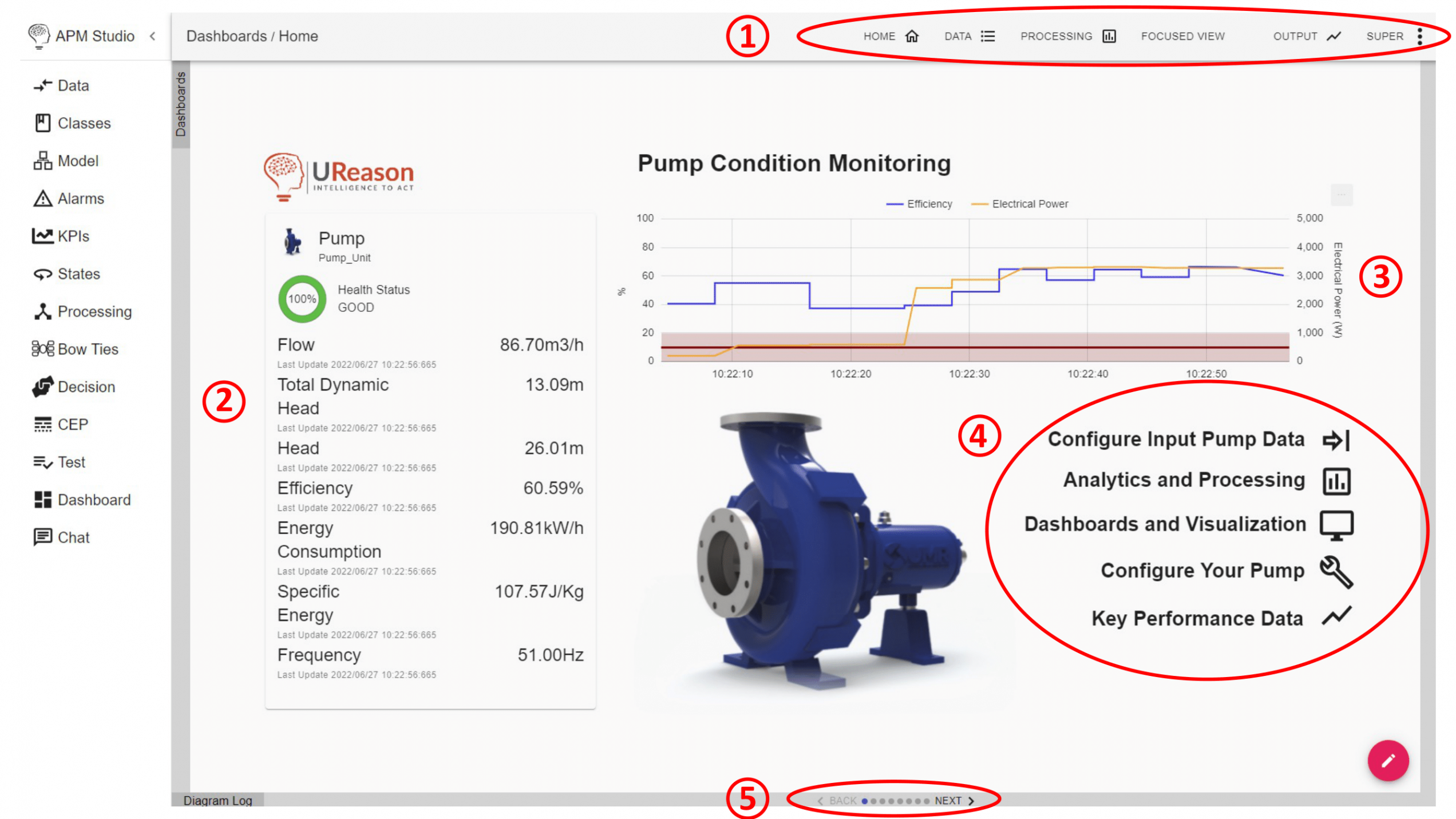
1) Top navigation menu – use this menu for your input & output settings
2) Asset card – displaying the condition of your pump and key parameters;
3) Power consumption and efficiency overview;
4) Navigation menu – use this menu to navigate through the application;
5) Bottom slider menu – navigation the different panes
From the main dashboard you can navigate to the different sections to configure and analyze your pump. In the below sections we will run you through the basic setup, so you can connect your own pump data and create a customized monitoring.
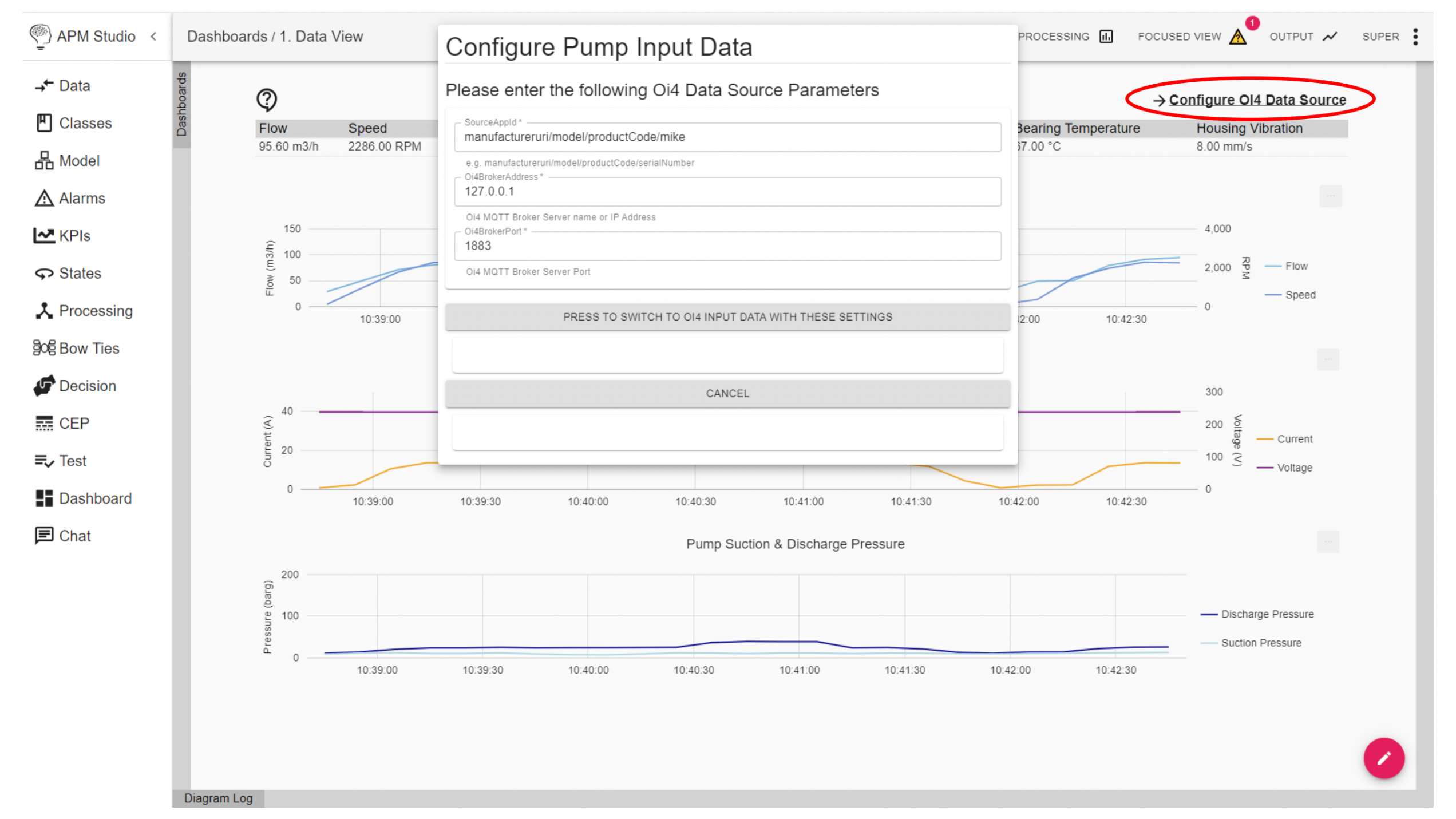
1.1. Configure Input Pump Data
The application runs a default dataset in the background to show a fully functional result of the monitoring application. When using the app to monitor your own pump(s) you can configure the pump input data with your own OI4 data source via the user interface.
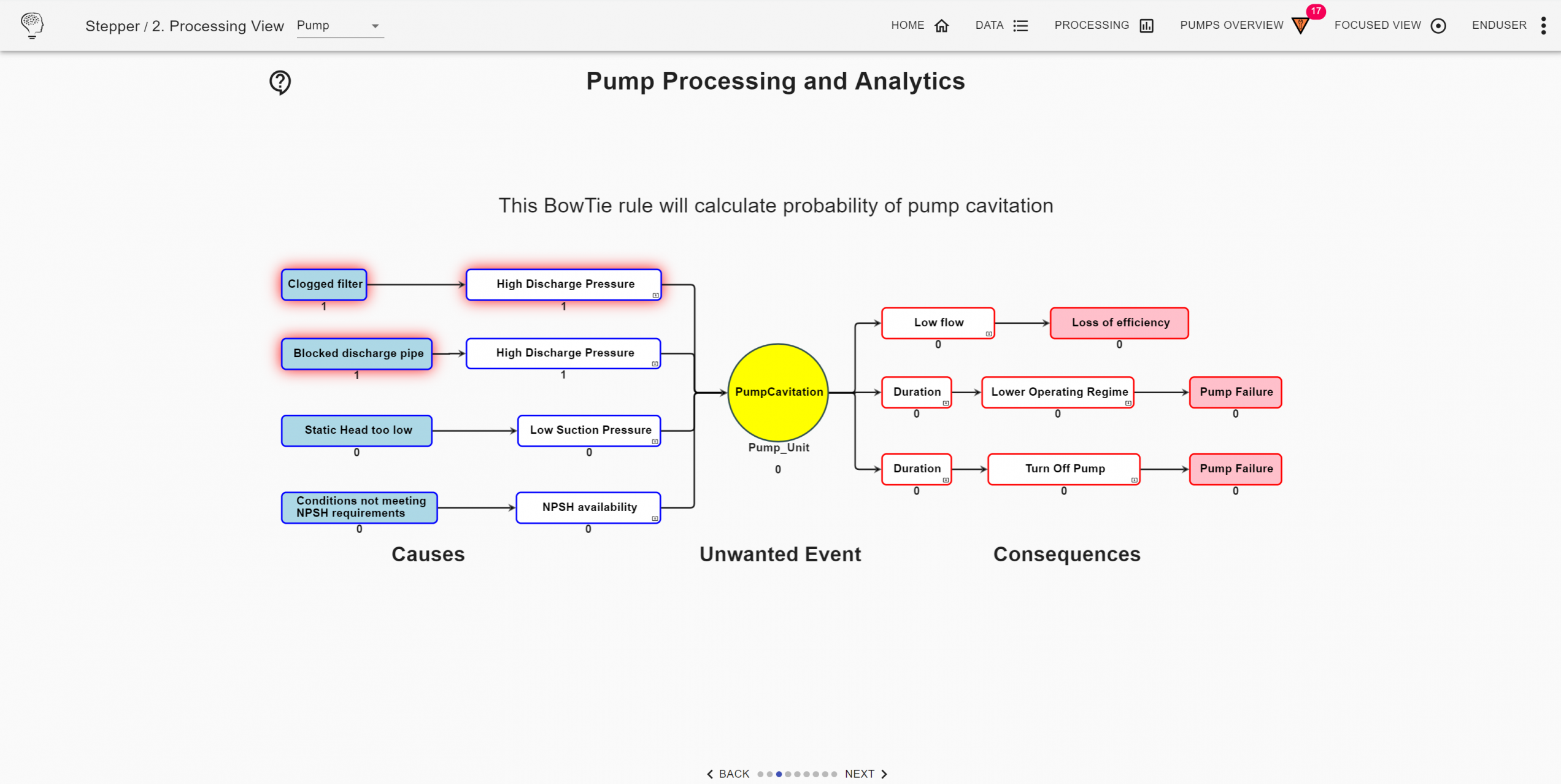
1.2. Analytics and Processing
The application is equipped with a bow-tie model for a centrifugal pump typical. Bow-tie models are cause-consequence models. This model detects known causes for pump condition based on the data and triggers events if the probability becomes too high. Results of the probability calculations are forwarded to the KPI and alerts section of the application.
This template model is built to detect pump cavitation. APM Studio allows you to conveniently create and configure multiple bow-tie models for different causes, events and consequences.
1.3. Dashboards and Visualization
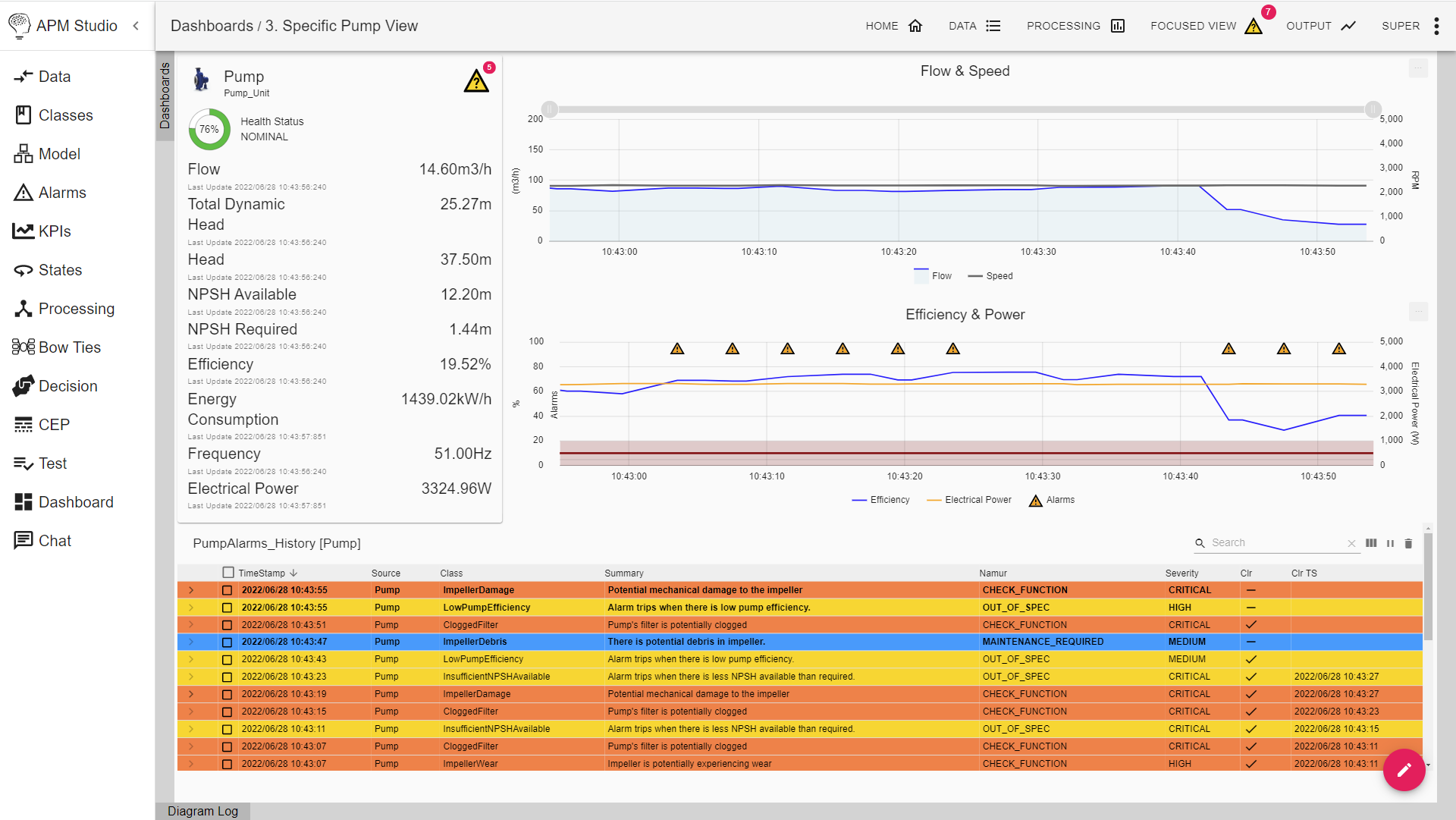
The dashboard and visualization section provides and overview of your pumps performance. On the left side you see some KPIs, along with live charts of the pumps flow & speed and efficiency & power. On the bottom section the alarm history is displayed. Here the results of the integrated alarms are displayed.
1.4. Configure Your Pump
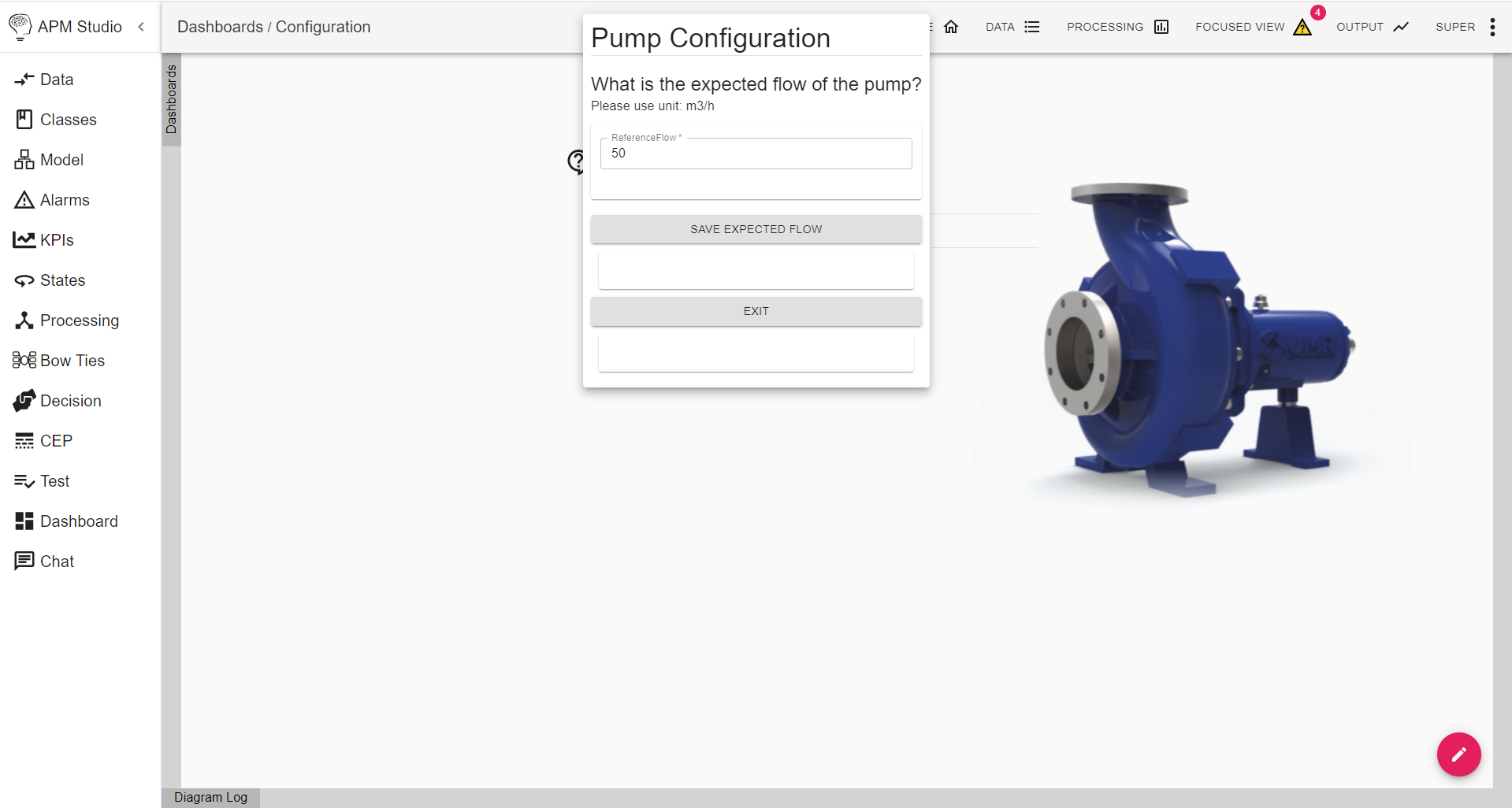
In this section you can configure your pump, so it matches the parameters and configuration or your actual pump, i.e. its reference flow.
1.5. Key Performance Data
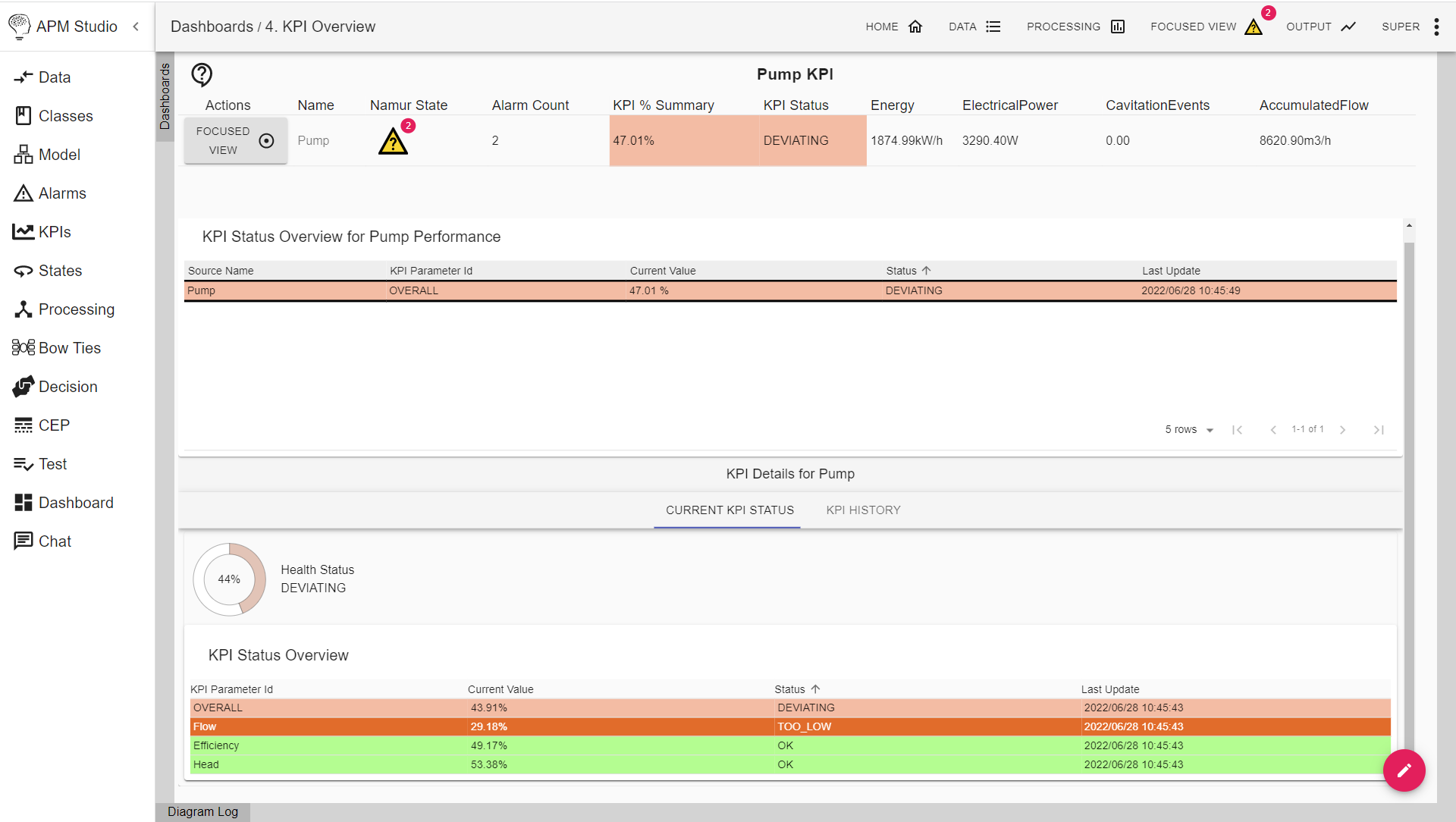
The key performance pane displays the performance of the pump on a number of key parameters. Default parameters used in this section are:
1) efficiency,
2) safety,
3) performance,
4) NPSH (Net Positive Suction Head), and
5) economy.
Next Steps
The Pump Health Monitoring Function Extension provides a completely integrated solution for centrifugal pumps. Parts of the app are configurable so that you can load in your own data and make use of the monitoring results, using OI4 connectivity.
We have standardized the application so that it provides ease of use, however this also comes with a reduction of the complete APM Studio suite. If you are interested in the further capabilities, customize your pump monitoring or the ability to create monitoring solutions for other assets, feel free to reach out to us.
What Is APM Studio?
APM Studio is a low-code software to build and maintain condition monitoring & predictive maintenance applications. Via a drag-and-drop interface users can set up complex monitoring applications with ease. Also customized scripts and machine learning models can be loaded into the application. APM Studio can be integrated through a large variety of interfaces and APIs with 3rd party software, such as CMMS systems, databases, visualization tools and others. This way APM Studio can be used as an intelligent and connectivity layer for e.g. direct alarm management, workorder generation and analytics. Due to its small footprint, applications built with APM can be run on chip, edge, dedicated servers and the cloud. For more info visit our website.
Do You Want to Try Out the New Pump Health Monitoring App?
Discover how to enable condition and performance monitoring “at scale”, automating maintenance work processes for 100s of pumps in the process plant!